
Product story
Backing up your phone photos should feel trustworthy
See which photos are safely backed up to Nextcloud, which still need attention, and when it is safe to free phone storage.
Published · Updated · 5 minute read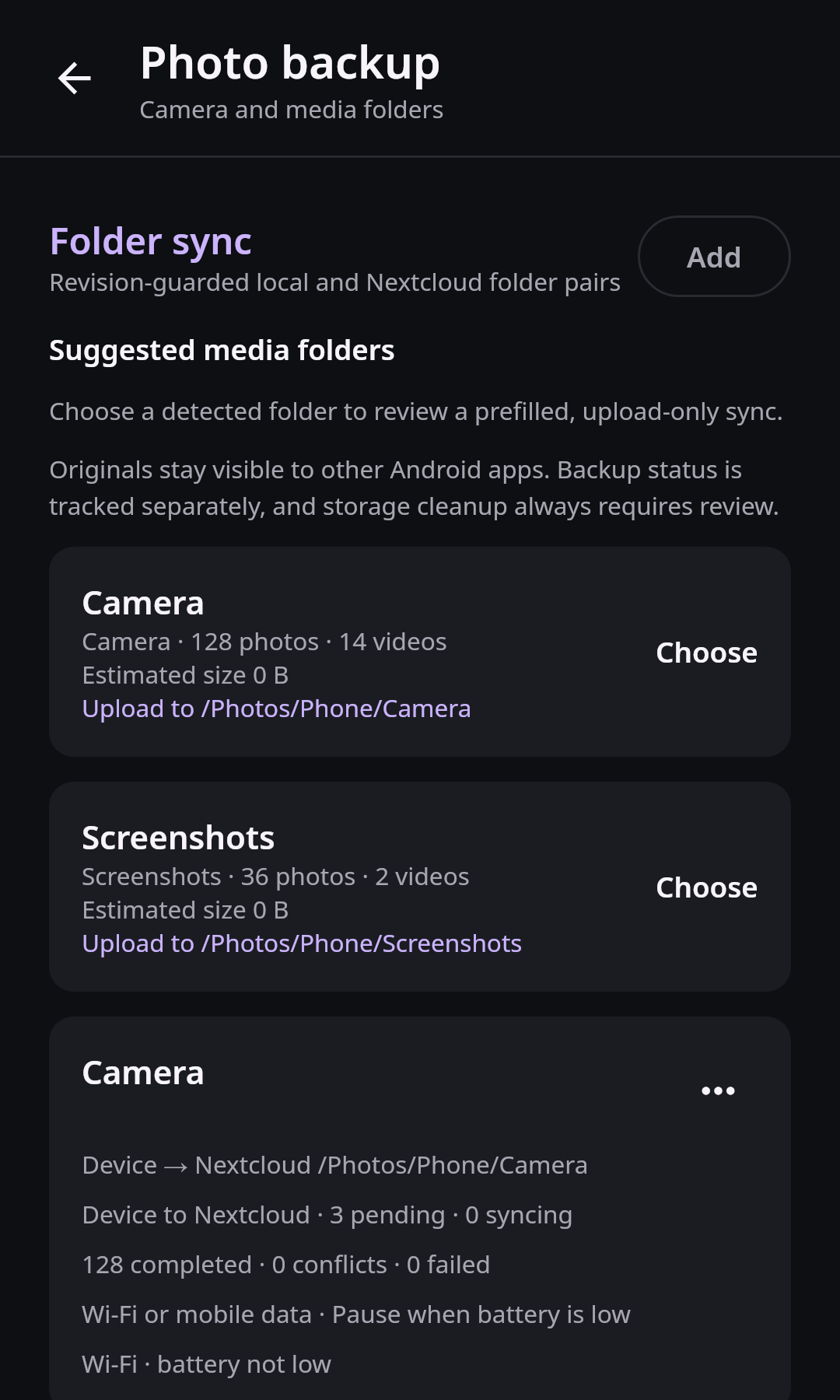
Phone photo backup has one job that matters more than every animation and gallery layout: tell the truth about whether a photo is safe. A green check should mean the exact version on the phone reached the expected account and was verified on the server. It should not mean that a file with the same name was uploaded once.
That distinction matters when the phone is full, a photograph was edited after its first upload, or a background transfer stopped halfway through a large camera folder. Nextcloud Native is being designed around visible evidence rather than optimistic queue state.
A backup badge has to mean something
Many backup tools reduce every file to uploaded or not uploaded. Real life has more states: waiting for Wi-Fi, currently transferring, uploaded but not yet verified, changed after upload, failed with a retry, intentionally excluded, or stored only in the cloud after local cleanup.
Without those distinctions, people have to open the server, compare folders, and guess before deleting anything. The problem becomes worse when an app “organizes” uploaded media by moving it into a private app folder. That can hide recent photos from WhatsApp, Instagram, Discord, editors, and Android’s normal media picker.
Our direction keeps current media in the normal Android library. Backup status is metadata about the file, not a new place the user has to keep it.
Transfer state and backup evidence are different
The media sync design now separates the transfer queue from backup evidence. A successful upload job is not enough to label a photo safe. The app records which local version was sent, which remote version was observed afterward, which account and destination were involved, and when verification completed.
The UI can then present meaningful states:
- Waiting means the item is queued but has not started.
- Uploading includes real progress for the current attempt.
- Verifying means bytes were sent and the server result is being checked.
- Backed up means the current local version matches durable verification.
- Changed means the phone file was edited after that verification.
- Failed keeps the reason and offers a safe retry.
- Cloud only means the verified local copy was removed with user confirmation.
These states belong in a compact summary and paged history. The app should remain responsive even when a camera roll contains tens of thousands of completed items.
From camera folder to verified copy
You enable backup for the Camera folder. Before saving, Nextcloud Native shows a small preview of the folder contents, the selected account, and a native picker for the Nextcloud destination. You choose whether transfers may use mobile data, whether videos are included, and whether background work should wait for charging.
After a weekend trip, the home screen says that most items are backed up, several videos are waiting for Wi-Fi, and one edited RAW/JPEG pair needs attention. Opening the transfer center starts with the useful summary. Pending and failed items appear first; completed history is available without loading every row into memory.
You edit a JPEG on the phone after it was uploaded. Its local revision no longer matches the verification record, so it returns to Changed. The older server copy still exists, but the app does not pretend that the new edit is protected.
When storage runs low, you choose Review space that can be freed. Only exact versions that were verified on the selected server are candidates. The review shows what will remain available in Nextcloud, then Android presents the final deletion confirmation. The app never silently removes the only local original.
Sharing after local cleanup
Cloud-only should not mean trapped. A cleaned-up photograph remains visible in the native gallery with an honest cloud indicator. Selecting Share downloads a temporary verified copy, hands it to Android’s share sheet, and manages that temporary storage without restoring the entire camera folder.
This preserves the storage benefit while keeping ordinary sharing with messaging and social apps practical. It also avoids pretending that a cloud-only item is instantly available when the phone is offline.
Formats and devices still to prove
The current developer build has media browsing, preview, and transfer foundations, but the complete evidence-backed backup flow is not ready for everyday use. Folder preview, durable paged history, background policy controls, multiple-account routing, verified cleanup, and cloud-only sharing still require integration and device tests.
Android vendors impose different background and battery rules. RAW formats, motion photos, edited derivatives, bursts, and RAW/JPEG pairs also need explicit test matrices. A feature is not complete merely because a single JPEG reaches a test server.
The path to safe storage cleanup
The next slice connects folder discovery and preview to a durable SQLite transfer store, adds native local and remote destination pickers, and exposes compact pending, failed, and completed views. Multiple account identity will be present in every queue and verification record.
After reliable background execution, the project can add the storage review flow, temporary cloud-only sharing, richer RAW/JPEG grouping, and stress tests against large camera libraries. The roadmap tracks each acceptance gate rather than hiding the work behind one “photo backup” checkbox.
Proof belongs outside the queue
A queue answers what work should run. It is mutable: entries retry, change priority, or eventually move to history. Backup evidence answers a different question: which exact local revision was proven to correspond to which remote revision.
Keeping those records separate prevents queue cleanup from erasing safety information. SQLite provides transactional updates and indexed queries by account, folder, state, and time. A worker can commit the remote verification and completed job atomically, while the UI reads bounded summaries and pages. Cleanup eligibility is derived from evidence for the current local revision, never from a filename or a past success badge.
Looking for concise version-by-version changes? Read the changelog.